






Teknovault
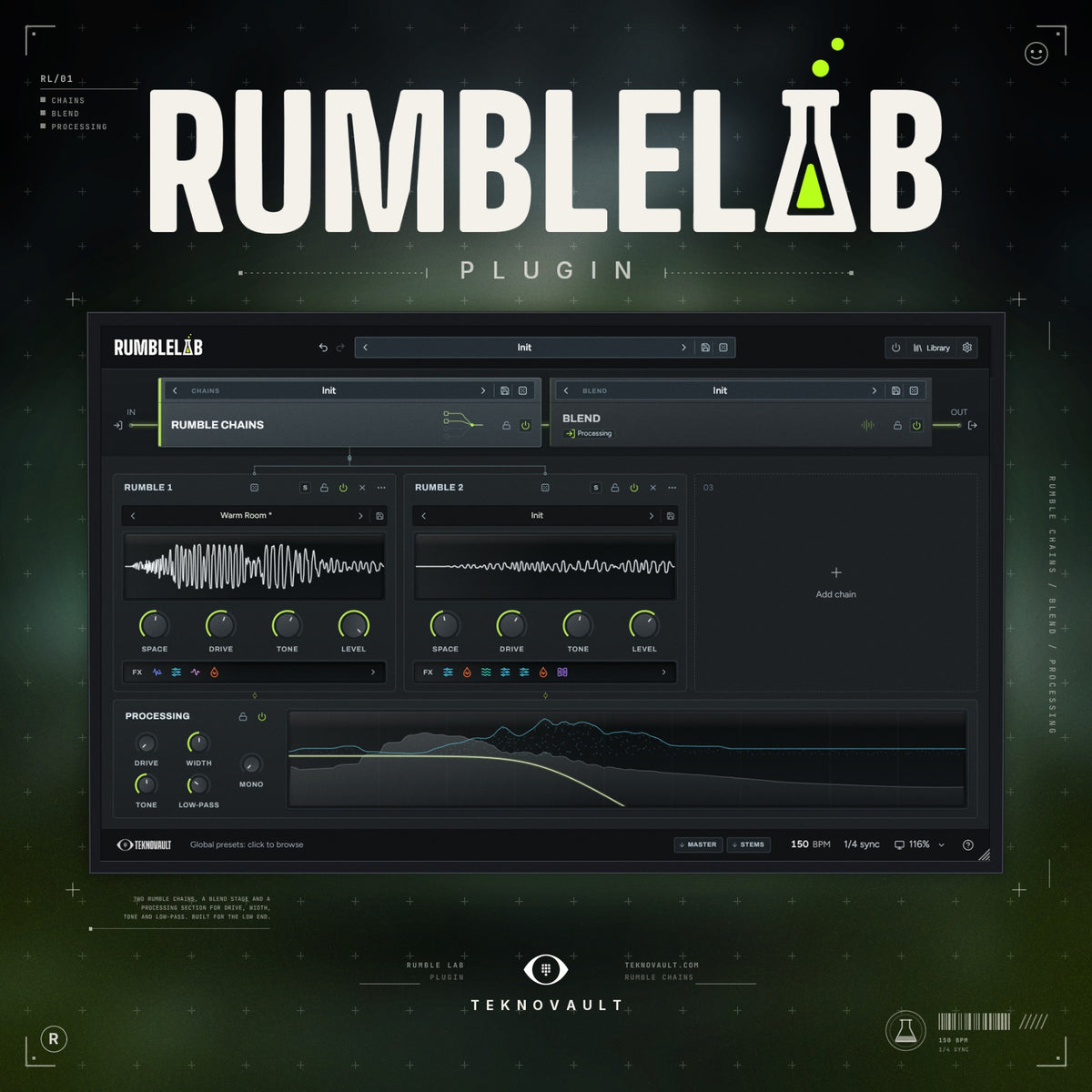
RumbleLab
FREE FUTURE UPDATES
- Works In All Major DAWs (Mac & Windows)
- Generate Professional Rumble Kicks in Seconds
- 3-Day Money Back Guarantee
- Instant Install & Access Anytime
THE MOST POWERFUL RUMBLE PLUGIN EVER MADE. INSTANTLY TURN ANY KICK INTO A RUMBLE KICK WITH ADVANCED CONTROL.
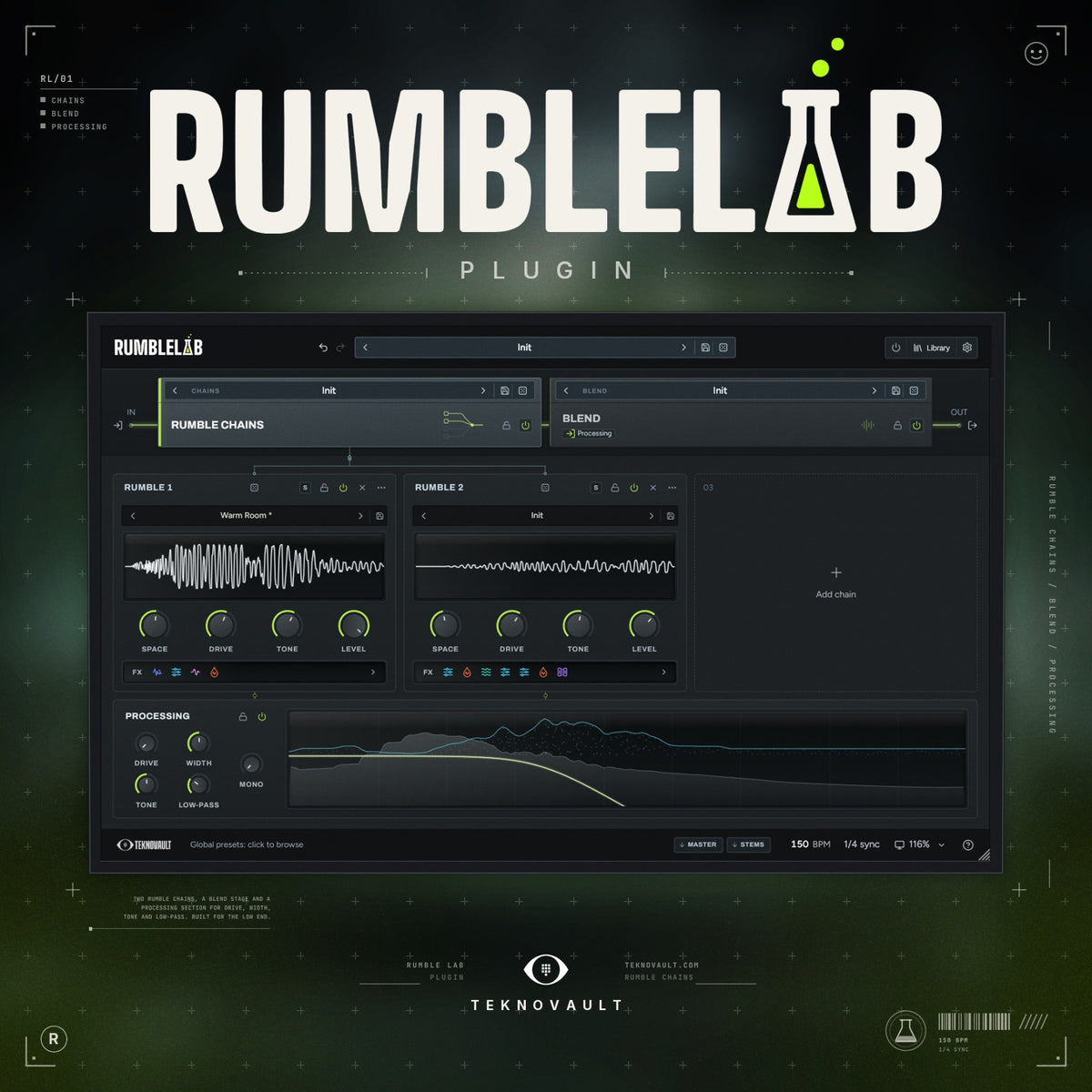
Instantly turn any boring punch into a powerful & Industry-Ready Rumble Kick. RumbleLab allows for unrivaled control over your Rumble with 3 intelligent Rumble Chains and a comprehensive Blend page.
Get access to 9 FX Modules in a Modular FX Chain per Rumble. Then randomize any chain, which builds the FX Chain for you from scratch. Suits all su
Some of the top features of this plugin:
-
Drop In Any Kick: Insane Rumble Kicks in Seconds
-
Features: Phase Optimisation, Random Rumble Generator, Factory Presets
- Incl: 3 Intelligent Rumble Generators
- Incl: Advanced Mixing Tab (perfect low-end & blend)
- Incl: Full Modular FX Chain (per rumble)
-
Incl: 11 FX Modules (Reverb, Delay, Convolver, Distortion, EQ & more)
- Genres: Hard Techno, Industrial, Schranz, Hard Groove, Underground, Acid, Minimal & more
The most powerful
techno rumble kick plugin
ever created
Take a deeper look at the plugin in action

- 01Generate a rumbleUp to three rumble chains, built from your own kick.
- 02Process your rumble11 FX modules, in any order, on every chain.
- 03Blend your kickGlue the punch and the rumble into one kick.
- Infinite rumble kicksRoll again: a new rumble on every click.
Specs
- MacAU, VST3 & standalonemacOS 11+, Apple silicon
- WindowsVST3 & standaloneWindows 10 or 11, 64‑bit
- Version1.0Out now
- Free updatesEvery future version
Works in
 FL Studio
 Ableton Live
 Logic Pro
 Cubase
 Bitwig Studio
 Studio One
 Reaper
 Reason 12+
 Nuendo
 GarageBand
FL Studio, Ableton Live, Logic Pro, Cubase, Bitwig Studio, Studio One, Reaper, Reason 12+, Nuendo, GarageBand.
Not supported: Pro Tools (needs AAX).
Rumble chains
Layer up to 3 rumble chains in seconds
Add a chain, hit RANDOM, and RumbleLab builds a brand-new Rumble Chain for you. This doesn’t use generative AI: it builds a fully functional, modular FX chain through complex rules. Stack 3 Rumble Chains, and easily tweak them.

Before & after
Turn any kick into a professional rumble kick
01Techno Kick 1
FX chains
Generate random rumble chains instantly
Not sure where to start? Hit RANDOM for a completely new Rumble Chain in one click. Every randomization sounds good because of the complex rules we’ve built into this plugin.
- 1Click randomize
- 2RumbleLab builds a Rumble Chain
- 3Drag any module up or down the chain
As a beginner, you can easily change the FX chain from the front with 4 easy-to-use knobs. As an advanced producer, you get unlimited control over every Rumble Chain.
Advanced rumble chain control

Explore every FX module to build rumble chains
Pick one from the chain, or drag the list to change the order.
- 01Reverb
- 02Convolver
- 03Delay
- 04Filters
- 05Phase Stack
- 06Distortion
- 07Volume Envelope
- 08Equalizer
- 09M/S Equalizer
- 10Multiband
- 11Limiter


Hall, room or plate, with decay, size and pre-delay. TAIL sets what happens when the next kick comes: the tail rings on, chokes just before it, or loops from the first beat.
Convolution with an impulse from the list. SPEED stretches or shrinks the impulse, TONE tilts it dark to bright, and you draw its level over the 0.45 s after each kick.
Repeats that start again on every beat, so they never run into the next one. 1/4 to 1/32 in sync, straight, dotted or triplet, with stutter, 16 groove patterns and a filter that darkens every repeat.
Low-pass, high-pass, band-pass, notch, phaser and comb, with slope, resonance and drive. Drag the graph to set the frequency and the amount.
Up to 32 allpass stages that smear the phase around one frequency: more stages, a longer zap. Drag the point on the graph to set both.
Nine modes, from hard clip and saturate to wavefold, fuzz, bitcrush and a waveshaper you draw yourself. The loudness stays steady, so DRIVE changes the character. Oversampled.
The Blend's volume envelope as a module, on any chain: its own shape, timing and bands. DEPTH sets how far it ducks.
Up to 12 bands: bells, shelves, cuts and notches. Click the graph to add a band, scroll for its Q, and pick minimum or linear phase.
Its own bands for the mid and for the side, plus WIDTH. High-pass the sides and the low end stays mono.
Three bands of upward and downward compression. DEPTH sets how hard it works, TIME the attack and release, and every band has its own gain.
THRESHOLD, RELEASE and CEILING, with a display of the level and what the limiter takes off.
Blend
Blend your kick & rumble with advanced control
Your rumble meets the punch here, in this order: shape it over the beat, mix it against the punch, catch the peaks, then check the result. Every panel draws the real sound, one beat wide.
InYour punch & rumble
Volume shaper
Sidechains your rumble to your punch. Turn on multiband mode (BANDS) to sidechain 3 frequency bands, each a different way.
- PresetsStart from a factory shape.
- DrawAdd a point, drag it, bend the curve.

Blend sliders
Blend the volume of your punch and rumble for the perfect balance between them.
- PunchThe punch level, -60 to +6 dB.
- RumbleThe rumble level, -60 to +6 dB.

Clipper
Easily clip your kick with 3 easy-to-use knobs: Gain, Clip and Softness. Soft clipping gives you rounder rumble kicks.
- ClipThe ceiling, -18 to 0 dBFS.
- GainDrives the sum into the ceiling.

Oscilloscope, spectrum & gain
The most effective way to phase-optimise your rumble. Turn the phase rotator (ROTATE) until the punch and rumble line up in the oscilloscope, or watch the frequencies change in Spectrum mode.
- OscilloscopeThe waveform over the beat.
- GainEach source’s level.
- SpectrumEach source’s frequencies.

OutOne kick
Navigate the plugin
Explore every feature of RumbleLab
Rumble chains

Blue: the plugin’s own buttons, click one to go to that screen. Red dots: the features.
Frequently asked questions
It builds a rumble from the kick you already have. Put it on your kick: up to three rumble chains turn it into layers of rumble, Processing finishes them together, and Blend glues the rumble to the punch and ducks it on every beat.
No. Every sound comes from your own kick, so every kick gets its own rumble.
No. The volume envelope ducks the rumble under the punch on every kick and follows your tempo, so the rumble makes room for the punch by itself.
GENERATE builds a whole rumble at once: three chains, in one of six styles (Hard Techno, Peak Time, Hypnotic, Dub Techno, Underground, Industrial). RANDOM rebuilds one chain and leaves the others. A locked chain stays as it is, and one Ctrl+Z takes a roll back.
Windows: VST3 and a standalone app. Mac: AU, VST3 and a standalone app. It works in every major DAW. Pro Tools is not supported, because it needs AAX.
Yes. Drag MASTER into your DAW for three files: the full kick, the rumble and the punch. Or STEMS, for one file per chain. WAV or AIFF, up to 32-bit float.
Yes. Every rumble you make is 100% royalty-free.
After ordering you get instant access to the installer. Run it (a .pkg on Mac): it installs the plugin, the standalone app and the manual.
In your library: log in with the email you ordered with, open Plugins and click Generate.
Almost always, you’re logged in with a different email than the one you ordered with. Every email is its own account, and your key is only on the account you ordered with. Log out of your library and log in again with that email. Just ordered? Your key can take a minute to show up. Give it a moment and refresh. Still nothing? Get in touch with your order number and we’ll sort it out.
Paste the key from your order and click ACTIVATE. It needs the internet once, then works offline. One activation covers every DAW and the standalone app on that computer.
Yes. On the old computer open Settings, ABOUT, Activation and click DEACTIVATE. Then activate on the new one.
The activation panel lists the computers your key is on. Click FREE next to one to use the key here instead. A key can free 2 computers a month.
Yes, for free. Whenever an update is ready, we send you the new installer.
Run the new installer. It keeps your presets and settings. Quit and reopen your DAW afterwards so it loads the new version.
You’re covered by our 3-day money-back guarantee. Get in touch through our contact page and we’ll sort it out.
Email us at shop@teknovault.com or reach us through our contact page. Found a bug? In Settings, ABOUT, click Copy diagnostics and paste it in your message.
Activate this computer: paste your key and click ACTIVATE.
Check the RUMBLE CHAINS power, each chain’s power and LEVEL, and the RUMBLE fader on the Blend page. A chain on solo mutes the others.
In Settings, AUDIO, set Kick detection to SENSITIVE, or CUSTOM with a lower threshold.
In Settings, AUDIO, set Tail limit to RING OUT, or Beat lock to OFF.
Turn ROTATE on the Blend page and watch the oscilloscope until they add up.
In Settings, set the frame rate to 30 (DISPLAY) and Ceiling quality to STANDARD 2X (AUDIO).
Run the RumbleLab installer again: it removes the old “Rumble Lab”.
Reviews
What people think about this plugin
Real reviews from producers who use it. Already making rumbles with it? Leave yours below.